What happens when you combine Mistral's vision models, real-time speech transcription, and a drug interaction agent, all running on managed European infrastructure? We built three medical AI demos in a single afternoon to find out.
At our recent cloudaura workshop in Wrocław, we showcased how Scaleway's managed AI services enable production healthcare applications without the typical infrastructure complexity. The goal: demonstrate that European cloud providers offer compelling alternatives for AI workloads, especially when data sovereignty matters.
This tutorial walks you through the architecture we built: a Consultation Assistant for real-time medical transcription using Voxtral, a Document Intelligence system combining RAG with vision-based extraction, and a Drug Interactions Agent that verifies medication safety using the ReAct pattern.
What you'll learn:
- When to choose Scaleway's serverless Generative APIs versus dedicated GPU instances with vLLM
- How to implement VPC security patterns that keep all data on European infrastructure
- Concrete code examples for each AI pattern: transcription, multimodal RAG, and agentic tool-calling
The complete source for everything below lives at github.com/cloudaura-io/medical-on-scaleway: three demo apps, the OpenTofu stack, and the architecture diagrams reproduced inline. Clone it first if you want to follow along against running infrastructure; the rest of the post explains how the pieces fit together.
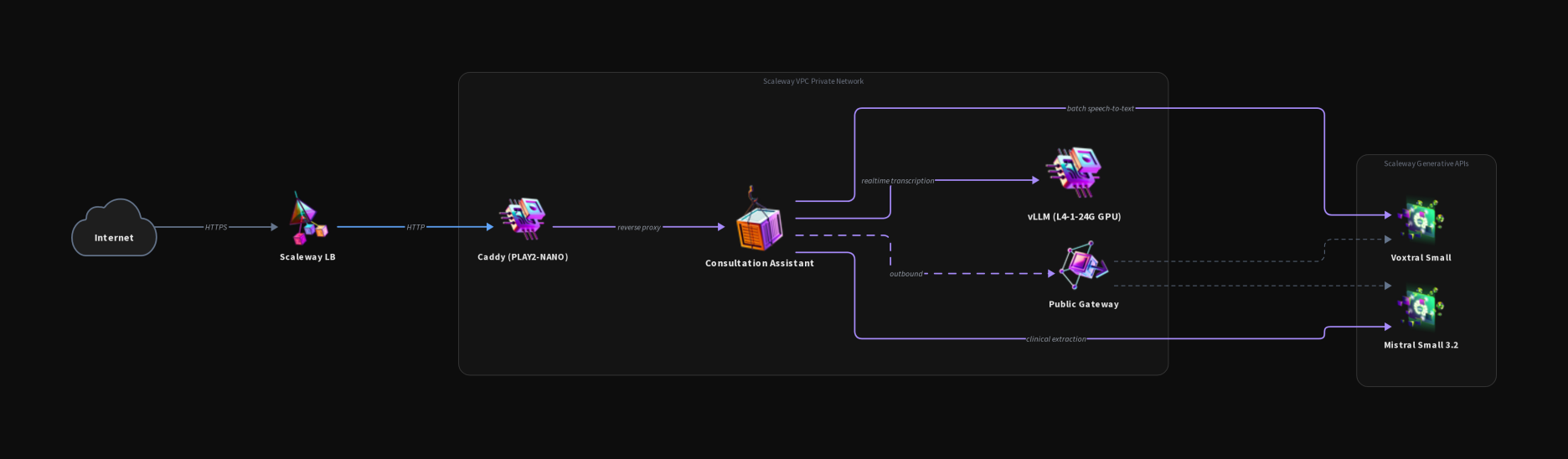
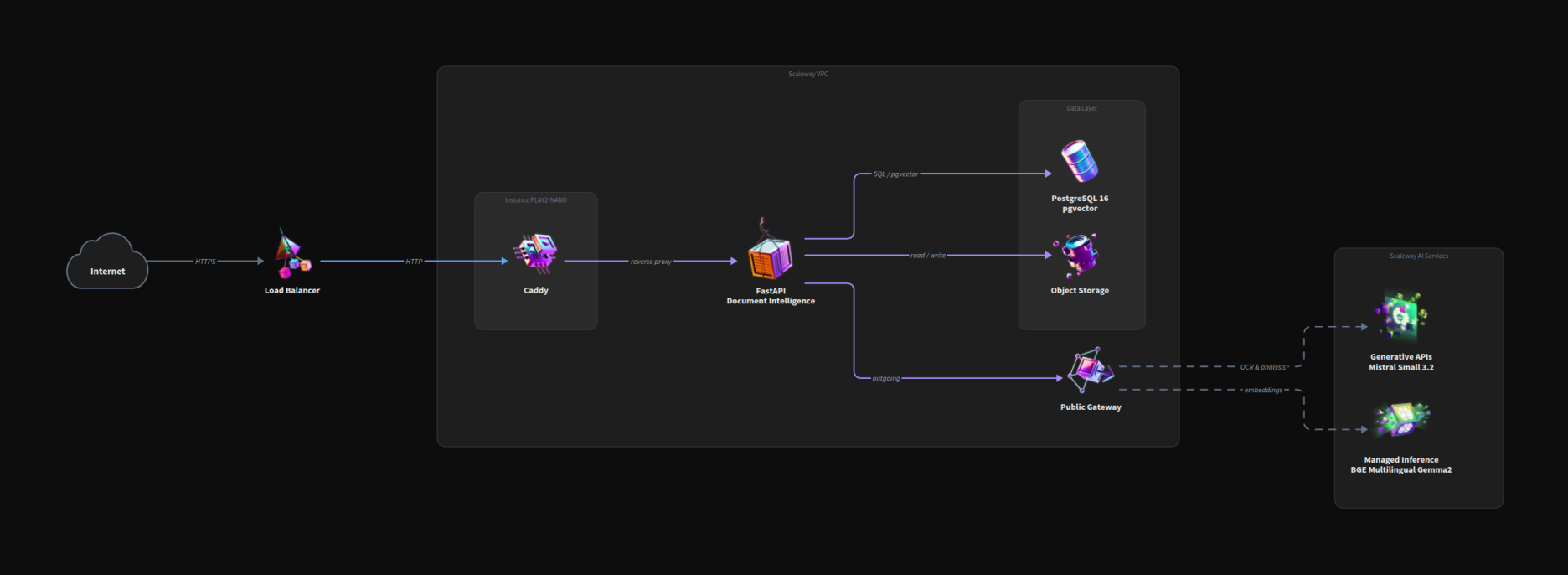
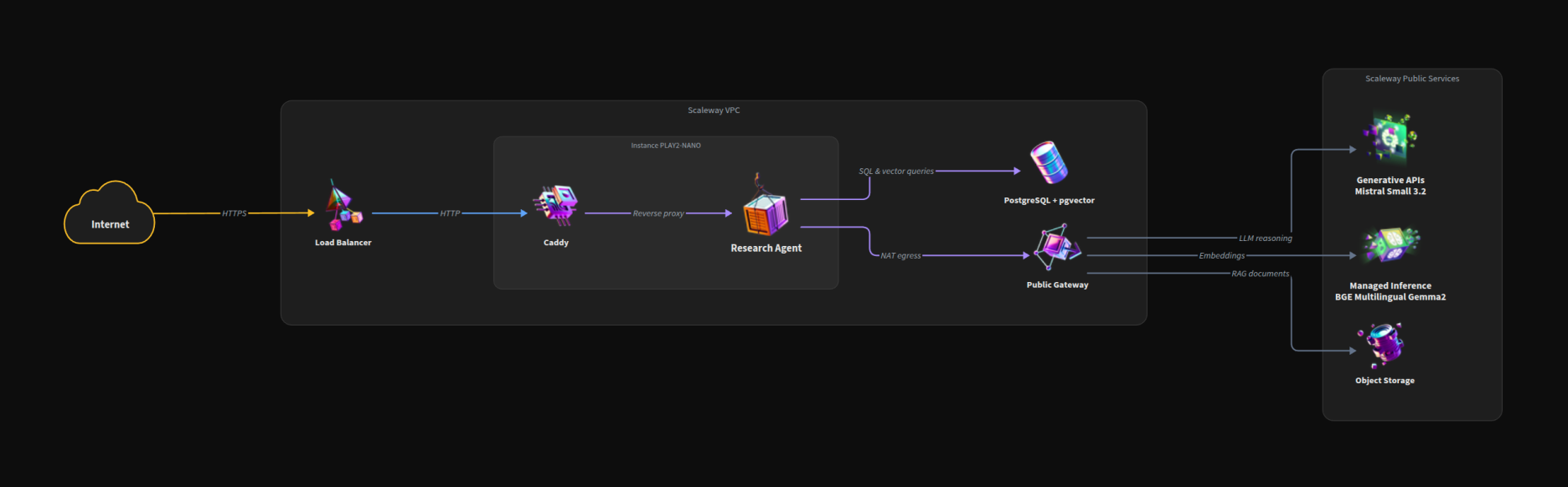
The Medical AI Lab runs three distinct demos on a shared Scaleway foundation. Each one has its own architecture diagram further down (one per demo), but they all reuse the same building blocks: a Load Balancer at the edge, a PLAY2-NANO host running Caddy as the reverse proxy, the demo application itself, and a Public Gateway for any traffic that needs to leave the VPC. Beyond that, each demo plugs in different Scaleway services depending on what it needs: a dedicated L4 GPU for the streaming model, a managed PostgreSQL with pgvector for the RAG pipeline, Object Storage for documents, or Generative APIs for chat, vision and embeddings.
Here's what each demo does:
- Consultation Assistant handles real-time speech-to-text transcription for medical consultations
- Document Intelligence extracts structured data from medical documents using vision and provides grounded RAG responses with citations
- Drug Interactions Agent uses the ReAct pattern with tool-calling to verify medication safety against the openFDA database
System Architecture
All instances we control sit inside a private VPC with no public IP addresses. Traffic enters through a Load Balancer (LB-S) handling HTTPS termination with Let's Encrypt certificates. The application runs on a PLAY2-NANO instance, while GPU workloads run on an L4-1-24G instance with 24GB VRAM. PostgreSQL with pgvector provides vector storage for the RAG pipeline. Calls to Scaleway's Generative APIs (Mistral Small 3.2, Qwen3 embeddings) are managed-service endpoints that live outside the VPC; they are reached over the public internet via a NAT/Public Gateway. We come back to what that means for data sovereignty in the next section.
Serverless vs. Self-Hosted: When to Choose Each
The key architectural decision we faced: when to use Scaleway's serverless Generative APIs versus self-hosted vLLM on a dedicated GPU.
| Criteria | Generative APIs (Serverless) | Self-hosted vLLM (GPU) |
|---|---|---|
| Use case | Chat, embeddings, batch processing | Real-time streaming, custom models |
| Pricing | Pay-per-token | Hourly GPU cost (€0.75/hour for L4) |
| Setup | Zero configuration | Requires instance management |
| Latency | Higher cold-start possible | Consistent low latency |
| Capacity ceiling | Account-level tier quotas (req/min, tokens/min) shared across all your apps; 429s when exceeded | Only bounded by your own GPU; predictable behaviour, no shared neighbour |
| Network placement | Managed endpoint outside your VPC, reached via NAT / Public Gateway | Lives inside your VPC, private-network only |
| Workshop examples | Document Intelligence, Drug Agent | Voxtral Transcription |
We chose Generative APIs for Mistral Small 3.2 (chat and vision) and Qwen3 embeddings (batch processing where per-token pricing makes sense). Voxtral runs self-hosted on vLLM because real-time streaming transcription demands consistent low latency without cold-start delays.
With this decision framework established, let's examine the infrastructure layer that makes it all work.
Private Networking Pattern
Every instance we provision has no public IP address. For healthcare data this is non-negotiable. Instances talk to each other only over the private VPC, and any outbound traffic leaves via a Public Gateway acting as NAT.
The Load Balancer (LB-S tier) sits at the edge, handling HTTPS termination with automatically-renewed Let's Encrypt certificates. This is your single point of ingress. Internal communication between the app instance and the GPU instance happens over private IPs on the VPC subnet.
So "everything stays in the VPC" applies to compute and storage we own. Two important asterisks:
- Managed PostgreSQL is a Scaleway managed service. We attach it to the VPC via the Private Network feature, so the application reaches it on a private IP, with no public endpoint exposed.
- Generative APIs are not VPC-attachable today. Calls to
api.scaleway.aiegress through the Public Gateway over the public internet to Scaleway's managed endpoint. Traffic stays inside Scaleway's network and the EU region you selected, but it does leave your VPC perimeter. For PHI workloads, that's a contract / DPA question, not a network-isolation one. If you need strictly in-VPC inference, self-host on the GPU instance (Voxtral pattern) instead of using Generative APIs.
The result: even if an attacker compromises your app, they can't reach your compute directly from the internet, and the database is never on a public endpoint. Inference traffic to the managed APIs is the one path you have to reason about explicitly.
Compute Instance Selection
We sized instances based on the workshop's requirements:
PLAY2-NANO handles the web application and API orchestration. At €0.01/hour, it's cost-effective for the coordination layer that doesn't need GPU acceleration.
L4-1-24G runs Voxtral via vLLM for streaming transcription (more on this in the next section). The L4 GPU offers 24GB GDDR6 memory, enough for Voxtral Mini 4B with room for batched requests. At €0.75/hour, it's significantly cheaper than larger GPU instances while delivering consistent inference latency. Scaleway offers L4 instances in Warsaw (WAW2), which aligned perfectly with our Wrocław workshop location.
Managed PostgreSQL with pgvector extension (version 0.8.1 on PostgreSQL 17) stores embeddings for the RAG pipeline. Using a managed database means automatic backups, scaling, and security patches (critical when you're focused on AI application logic rather than database operations). The pgvector extension supports L2 distance operators for similarity searches, which integrates cleanly with our embedding pipeline.
Now that the infrastructure is in place, let's explore our first demo: real-time medical transcription.
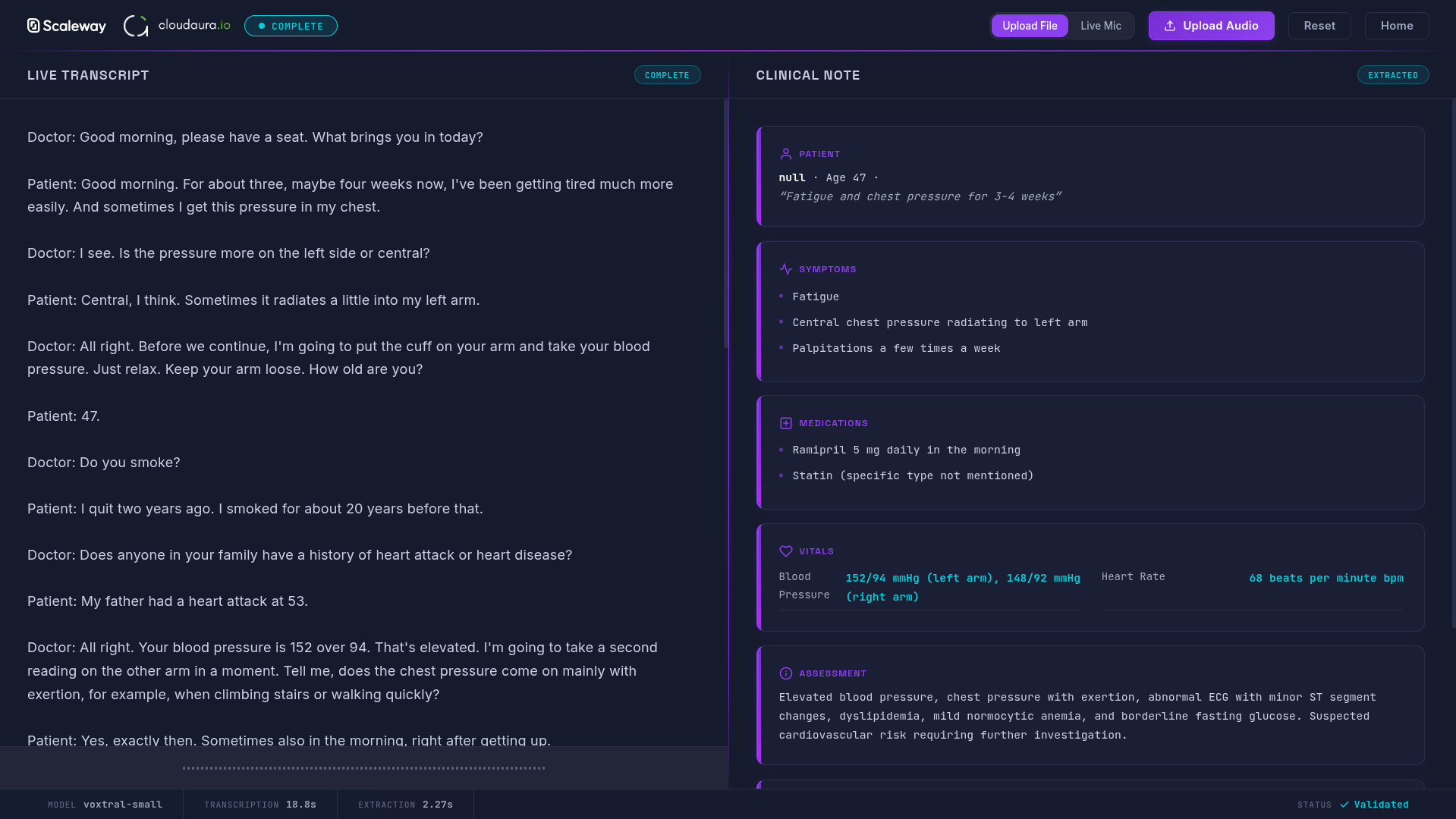
The Consultation Assistant transcribes medical consultations in real-time. Doctors speak, and structured notes appear, capturing symptoms, diagnoses, and treatment plans as they're discussed.
Setting Up Voxtral with vLLM
We chose Voxtral Mini 4B Realtime for streaming transcription. While Scaleway offers Voxtral through their Generative APIs, we self-host for one reason: real-time streaming demands consistent latency.
Serverless endpoints can introduce cold-start delays. For a live transcription experience (where users expect words to appear as they speak), those delays break the interaction. Self-hosted vLLM on our L4 GPU (introduced in the infrastructure section) keeps the model warm and responsive.
Voxtral's specifications make it ideal for medical contexts:
- Handles up to 30 minutes of audio for transcription tasks
- Processes audio in 30-second chunks at 80ms per token
- Outperforms Whisper large-v3 on transcription benchmarks
- Apache 2.0 license allows self-hosting without licensing concerns
Streaming Transcription Code
The vLLM server exposes an OpenAI-compatible endpoint:
# vllm serve mistralai/Voxtral-Mini-4B-Realtime --port 8000 --host 0.0.0.0
# openai>=1.30.0

from openai import OpenAI

client = OpenAI(
    base_url="http://gpu-instance.vpc.local:8000/v1",
    api_key="not-required"  # Internal VPC, no auth needed
)

def transcribe_audio(audio_file_path: str) -> str:
    """Transcribe audio file using self-hosted Voxtral."""
    with open(audio_file_path, "rb") as audio:
        response = client.audio.transcriptions.create(
            model="mistralai/Voxtral-Mini-4B-Realtime",
            file=audio,
            response_format="text"
        )
    return response

# For streaming chunks (real-time transcription)
async def transcribe_stream(audio_chunks):
    for chunk in audio_chunks:
        result = client.audio.transcriptions.create(
            model="mistralai/Voxtral-Mini-4B-Realtime",
            file=chunk,
            response_format="text"
        )
        yield result
The OpenAI SDK compatibility means existing transcription code works with minimal changes. Just point to your self-hosted endpoint instead of OpenAI's servers.
Verification step: After deploying, test by sending a short audio clip to the /v1/audio/transcriptions endpoint. You should see transcribed text within 1-2 seconds.
Building on this foundation, the next demo shows how to extract structured data from medical documents using vision capabilities.
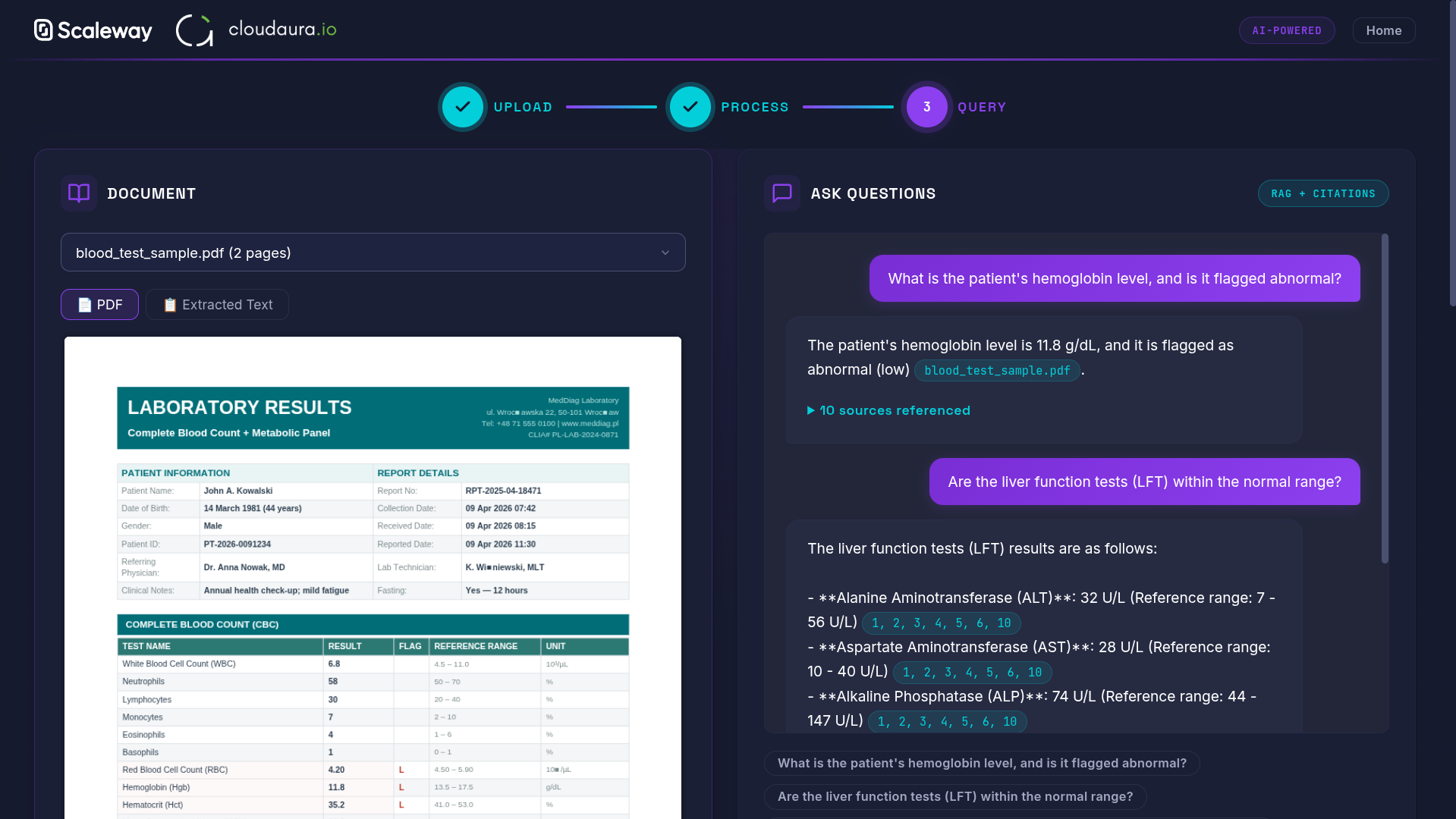
The Document Intelligence demo tackles a common healthcare challenge: extracting structured information from scanned medical documents and making it queryable through natural conversation.
Document Extraction with Mistral Vision
When a medical document arrives (lab results, prescriptions, clinical notes), we use Mistral Small 3.2's vision capabilities to extract structured data. Unlike the self-hosted Voxtral in the previous demo, document extraction uses Scaleway's serverless Generative APIs. Pay-per-token pricing makes sense here, since document processing happens in batches, not real-time streams.
The model processes document images and returns JSON conforming to a defined schema:
# openai>=1.30.0, psycopg2>=2.9.9
import base64
from openai import OpenAI

client = OpenAI(
    base_url="https://api.scaleway.ai/v1",
    api_key="SCW_API_KEY"  # Set via environment variable
)

# 1. Vision-based document extraction
def extract_from_document(image_path: str) -> dict:
    with open(image_path, "rb") as f:
        b64_image = base64.b64encode(f.read()).decode()

    response = client.chat.completions.create(
        model="mistral-small-3.2-24b-instruct-2506",
        messages=[{
            "role": "user",
            "content": [
                {"type": "text", "text": "Extract patient name, diagnosis, and medications as JSON."},
                {"type": "image_url", "image_url": {"url": f"data:image/png;base64,{b64_image}"}}
            ]
        }],
        response_format={"type": "json_object"}
    )
    return response.choices[0].message.content
The response_format={"type": "json_object"} parameter ensures consistent JSON parsing, which is critical when downstream systems depend on the extracted data.
RAG Pipeline with pgvector
Once documents are extracted, we need to make them searchable. Qwen3 Embedding 8B generates embeddings for document chunks and stores them in the PostgreSQL instance we provisioned earlier. At 768 dimensions (truncated from 4096 using the Matryoshka technique), it balances quality and storage efficiency. This model ranks #3 on the MTEB leaderboard as of late 2025.
# 2. Generate embeddings and store in pgvector
def embed_and_store(text: str, doc_id: str, cursor):
    embedding = client.embeddings.create(
        model="qwen3-embedding-8b",
        input=text,
        dimensions=768  # Matryoshka truncation from 4096
    ).data[0].embedding

    cursor.execute(
        "INSERT INTO documents (id, content, embedding) VALUES (%s, %s, %s)",
        (doc_id, text, embedding)
    )

# 3. Similarity search for RAG retrieval
def search_similar(query: str, cursor, limit: int = 3) -> list:
    query_vec = client.embeddings.create(
        model="qwen3-embedding-8b", input=query, dimensions=768
    ).data[0].embedding

    cursor.execute(
        "SELECT content FROM documents ORDER BY embedding <-> %s LIMIT %s",
        (query_vec, limit)
    )
    return [row[0] for row in cursor.fetchall()]
Grounded Responses with Citations
For medical applications, grounded responses are non-negotiable. When users ask questions, the RAG pipeline retrieves relevant document chunks and the LLM generates responses that cite specific sources:
"Based on the lab results from January 15th [Source: lab_results_2026_01_15.pdf], your hemoglobin levels are within normal range at 14.2 g/dL."
This citation pattern builds trust and allows medical professionals to verify AI responses against original documents.
One useful extension for anyone taking this past a workshop demo: don't let the model decide on its own what "within normal range" means. Maintain a second, separate embeddings collection of current reference ranges (lab norms, age/sex-adjusted thresholds, unit conventions) sourced from authoritative material your team controls, and require the agent to retrieve from it before interpreting any numeric value. Now "14.2 g/dL is normal" is grounded in two artifacts (the lab document AND the norm) instead of model memory. We don't wire this up in the workshop demo to keep the moving parts manageable, but it's the obvious next step once you're past "does it run".
The same grounding theme continues in the next demo, where the stakes are even higher.
Verification step: Upload a test document and query it. You should see the extracted JSON structure and be able to ask natural language questions that return cited answers.
Now that we understand how to extract and query documents, let's explore the most sophisticated demo: an agentic system that verifies drug interactions.
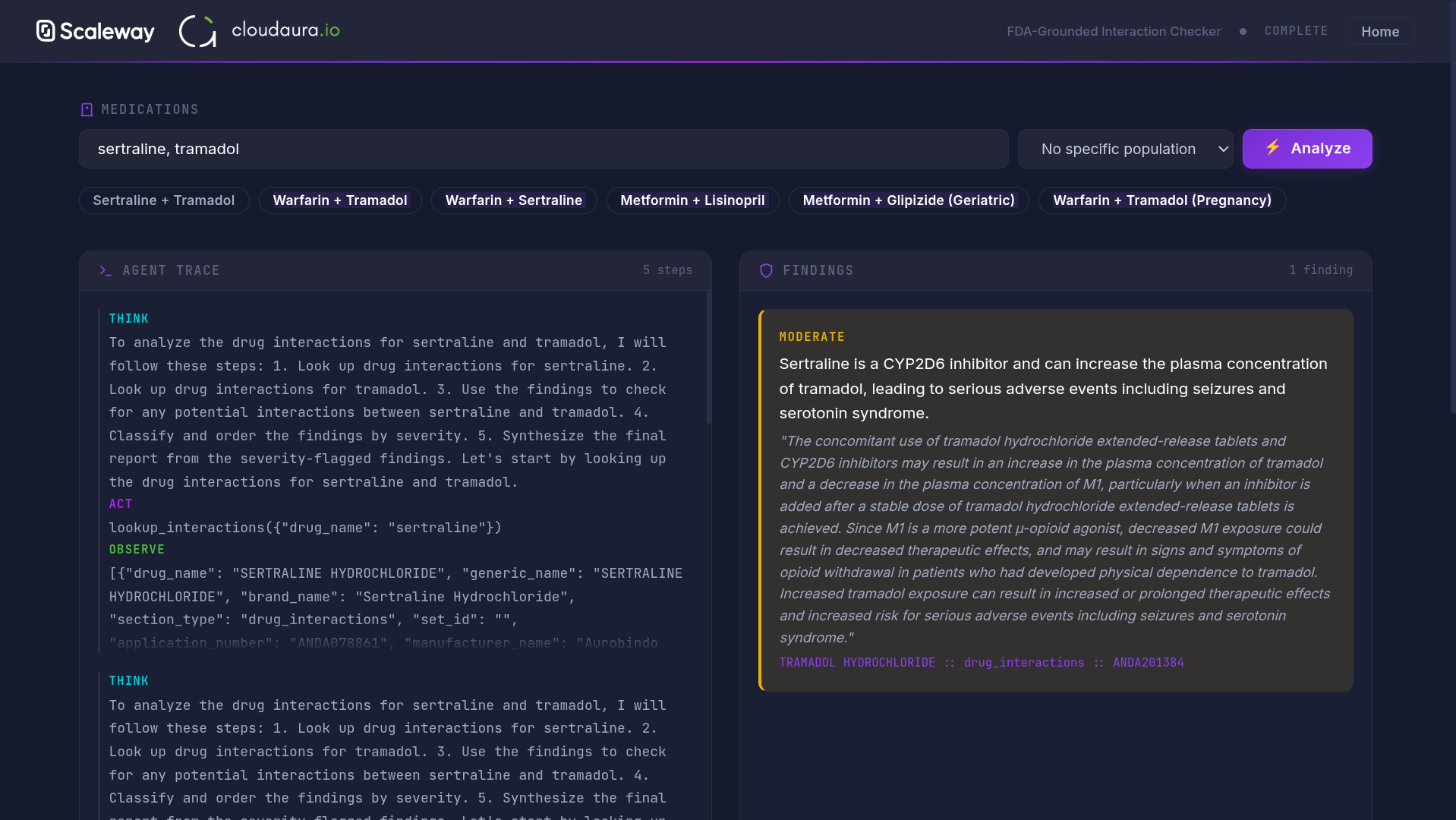
The Drug Interactions Agent demonstrates the ReAct pattern, where an LLM reasons about queries, takes actions (tool calls), observes results, and synthesizes responses. For medication safety, this pattern combined with verification steps provides appropriate guardrails.
The ReAct Agent Pattern
While the Document Intelligence demo showed how AI can extract and retrieve information, the Drug Interactions Agent demonstrates active reasoning, where the AI thinks through problems step by step.
When a user asks "Can I take ibuprofen with my current blood pressure medication?", the agent doesn't generate an answer from training data alone. Instead, it follows a structured reasoning loop:
- Reason: Identify that we need to check interactions between ibuprofen and common blood pressure medications
- Act: Call the openFDA API to retrieve drug interaction data
- Observe: Parse the API response for relevant warnings
- Respond: Synthesize findings with appropriate medical disclaimers
This pattern grounds responses in authoritative data rather than potentially outdated training knowledge, similar to how the Document Intelligence demo grounds responses in uploaded documents, but using live API data instead.
Tool Calling with Mistral
Mistral Small 3.2 supports native tool-calling. Like the vision and embedding calls in previous demos, this uses Scaleway's serverless Generative APIs. The model generates structured function calls that your application executes:
Further reading: if you want the broader picture of how raw function-calling like the example below relates to the Model Context Protocol (MCP) that's now reshaping how agents talk to tools, see our companion post Understanding Model Context Protocol (MCP). The pattern in this section is the "bare" tool-calling primitive; MCP is what you reach for when you want to share that same toolset across many agents and clients without rewriting glue every time.
# openai>=1.30.0, httpx>=0.27.0
import json
import httpx
from openai import OpenAI

client = OpenAI(base_url="https://api.scaleway.ai/v1", api_key="SCW_API_KEY")

# Tool definition for openFDA drug lookup
tools = [{
    "type": "function",
    "function": {
        "name": "check_drug_interactions",
        "description": "Query openFDA for drug interaction warnings",
        "parameters": {
            "type": "object",
            "properties": {
                "drug_names": {"type": "array", "items": {"type": "string"}}
            },
            "required": ["drug_names"]
        }
    }
}]

def query_openfda(drug_names: list[str]) -> str:
    """Fetch drug interactions from openFDA API."""
    query = "+AND+".join(f'openfda.generic_name:"{d}"' for d in drug_names)
    url = f"https://api.fda.gov/drug/label.json?search={query}&limit=5"
    resp = httpx.get(url, timeout=10)
    return json.dumps(resp.json().get("results", [])[:2])  # Truncate for context

def react_agent(user_query: str, max_turns: int = 5) -> str:
    """ReAct loop: reason -> act -> observe -> respond."""
    messages = [{"role": "user", "content": user_query}]

    for _ in range(max_turns):
        response = client.chat.completions.create(
            model="mistral-small-3.2-24b-instruct-2506",
            messages=messages,
            tools=tools,
            tool_choice="auto"
        )
        msg = response.choices[0].message
        messages.append(msg)

        if not msg.tool_calls:
            return msg.content  # Final answer

        for call in msg.tool_calls:
            args = json.loads(call.function.arguments)
            result = query_openfda(args["drug_names"])
            messages.append({"role": "tool", "tool_call_id": call.id, "content": result})

    return "Unable to complete - max turns reached"
Safety Patterns for Healthcare AI
For healthcare applications, we layer additional safeguards:
- Chain-of-verification: After the initial response, the agent re-checks its reasoning against the source data
- Human-in-the-loop: Responses include "This is informational only. Consult your healthcare provider"
These patterns acknowledge that medication decisions require professional oversight. The AI assists; it doesn't decide.
Verification step: Ask about a well-known drug interaction (like warfarin and aspirin). The agent should call the openFDA tool and cite specific warnings from the database.
With all three demos covered, let's look at how the whole stack gets deployed reproducibly and what stays consistent across the three apps.
Infrastructure as Code with OpenTofu
The entire stack provisions via OpenTofu (the open-source Terraform fork). This means reproducible deployments. Spin up the workshop environment in any Scaleway region with a single command.
Here's how the GPU instance and Load Balancer are defined:
resource "scaleway_instance_server" "gpu" {
  type  = "L4-1-24G"
  image = "ubuntu_jammy_gpu"

  private_network {
    pn_id = scaleway_vpc_private_network.main.id
  }

  # No public IP - access only through VPC
  enable_public_ip = false
}

resource "scaleway_lb" "main" {
  type = "LB-S"

  private_network {
    pn_id = scaleway_vpc_private_network.main.id
  }
}
Notice how both resources reference the same VPC (scaleway_vpc_private_network.main.id), enforcing the private networking pattern we discussed in the infrastructure section. The enable_public_ip = false setting is what keeps your instances off the public internet.
The deployment workflow:
- Build the Docker image
- Tag it for each service (app, worker, scheduler)
- Push to Scaleway Container Registry
- Apply the OpenTofu configuration
AI Safety Patterns Recap
Throughout this tutorial, we've woven in several safety patterns that are especially important for healthcare AI:
| Pattern | Where Used | Purpose |
|---|---|---|
| Structured Output | Document Intelligence | Prevents hallucinated JSON formats |
| Grounded Responses | Document Intelligence, Drug Agent | Citations enable verification |
| Chain-of-Verification | Drug Agent | Re-checks reasoning against source data |
| Human-in-the-Loop | All demos | Medical disclaimers, review workflows |
These patterns acknowledge a fundamental truth: in healthcare, AI assists human decision-making rather than replacing it.
Final verification: After deployment, run curl -k https://your-lb-ip/health from within the VPC. All services should return healthy status, and no external access should be possible to your compute instances.
We've walked through three distinct AI patterns running on Scaleway's managed European infrastructure:
- Real-time Transcription: Voxtral on self-hosted vLLM for consistent streaming latency
- Document Intelligence: Mistral vision + Qwen3 embeddings + pgvector for grounded RAG with citations
- Drug Interactions Agent: ReAct pattern with tool-calling for verifiable, safety-conscious responses
Key Takeaways
The central architectural decision: use serverless Generative APIs for chat, embeddings, and batch processing, where pay-per-token pricing makes sense and cold-starts are acceptable. Self-host on GPU when real-time streaming demands consistent latency.
All three demos share the same security foundation: private VPC, no public IPs, HTTPS termination at the load balancer. This pattern scales to production healthcare workloads where data sovereignty matters.
Get Started
All source code is available at github.com/cloudaura-io/medical-on-scaleway. Clone it, adjust the OpenTofu variables for your Scaleway account, and deploy the complete stack:
git clone https://github.com/cloudaura-io/medical-on-scaleway
cd medical-on-scaleway
# Edit terraform.tfvars with your Scaleway credentials
tofu apply
Extending the Architecture
Want to build on these patterns? Consider:
- Expanding the Drug Agent: Add tools for clinical trial lookups, dosage calculators, or pharmacy inventory checks
- Supporting more document types: DICOM images for radiology, HL7 messages for lab results, PDF prescriptions
- EHR integration: Connect to existing healthcare systems through FHIR APIs
The architecture handles these extensions without fundamental changes. Add new tools to the agent, new extractors to the document pipeline, or new API integrations to the RAG system.
Healthcare AI on European infrastructure isn't just possible; it's practical. Scaleway's managed services handle the undifferentiated heavy lifting so you can focus on the AI patterns that matter for your users.
References
- cloudaura Medical AI Lab on Scaleway - GitHub Repository
- Generative APIs Rate Limits - Scaleway Documentation
- PLAY2 Virtual Instances - Scaleway Product Page
- L4 GPU Instance - Scaleway Product Page
- Managed PostgreSQL & MySQL - Scaleway Product Page
- ReAct: Reason + Act Prompting Pattern - Prompt Engineering Guide
- Understanding Model Context Protocol (MCP) - cloudaura Blog
- OpenTofu - Open-Source Terraform Fork